Autel AutoLink AL619 Scanner, ABS SRS & CAN OBD2 Diagnostic Scan Tool, 10 OBDII Test Modes, DTCs Lookup, Live Data, Check Engine Light Code Reader, Upgraded of ML619 AL519 ML519 AL319
Autel AutoLink AL619 ABS / SRS Diagnosis OBDII Scanner
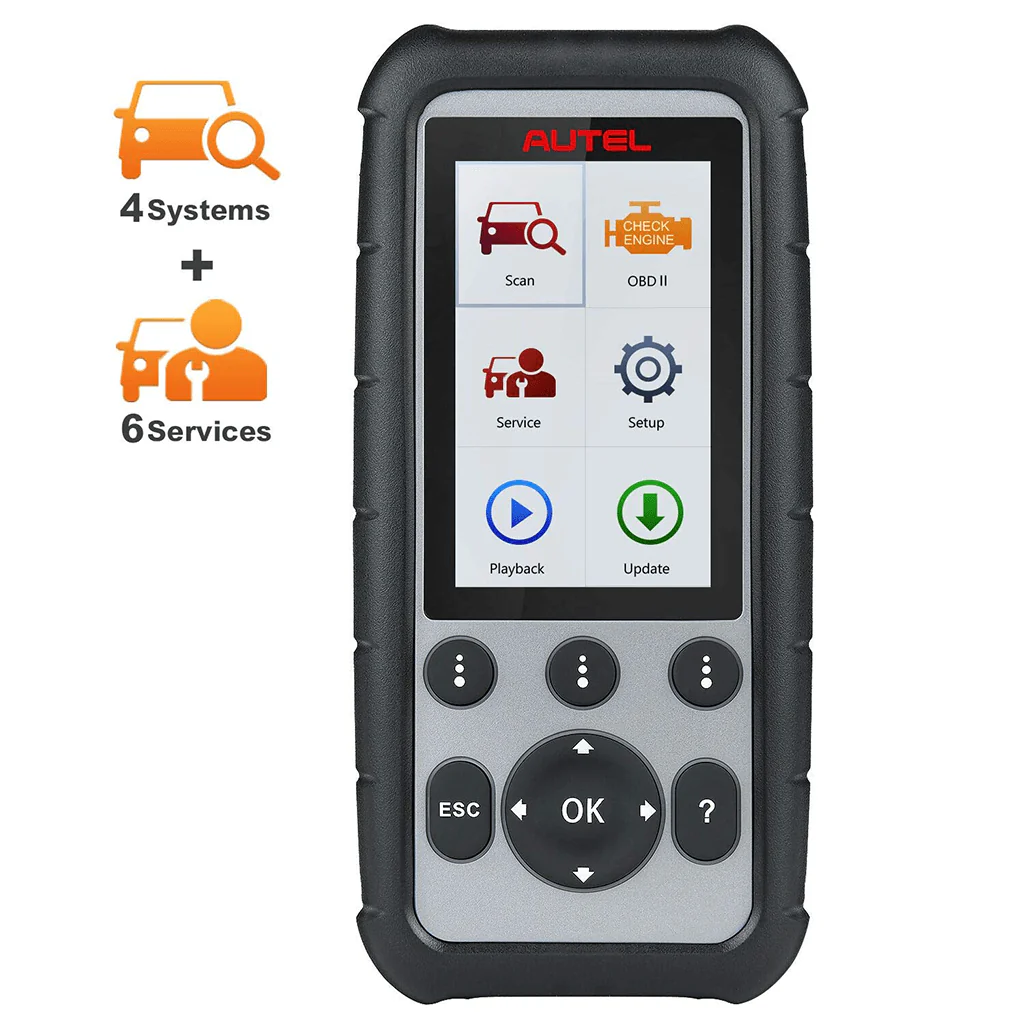
Autel AutoLink AL619 is the perfect tool for detecting faults in vehicle Anti-Lock Brake (ABS) and Supplemental Restraint System (SRS)/Airbag systems, as well as performing OBD II diagnostics. It provides both visual and audible cues to enhance the tool's ability to aid in quick fault discovery. On-screen troubleshooting tips are also provided to speed up repairs.

Autel AutoLink AL619 Main Functions:
- 1. ABS/ SRS system diagnosis.
- 2. Reading codes, clearing codes
- 3. DTC lookup
- 4. Viewing live data steam in text and graphing for OBDII functions
- 5. Viewing freeze frame data, retrieving I/M readiness status
- 6. Performing O2 monitor test
- 7. On-Board Monitor Test
- 8. Component Test
- 9. Component Test
- 10. Module present and turning off Check Engine Light (MIL)
- 11. Retrieves generic (P0, P2, P3 and U0), manufacturer-specific (P1, P3 and U1) and pending codes
- 12. Internet Updatable & TF memory card for data backup & Diagnosis data playback & printing
ABS/SRS Diagnostic Scanner
The Autel AL619 car diagnostic scan tool is specifically designed to perform ABS/SRS diagnosis, read/erase ABS and SRS (Airbag) codes, and reset the ABS/SRS light on 30+ US, EU, and Asian car makes. It covers model years ranging from 2000 to 2013/2014, and some models from 2015/2016. It provides code definitions to help diagnose problem areas within the systems that may cause the Malfunction Indicator Light (MIL) to illuminate.
Note: The Autel AL619 is not intended for use with newer cars, and its compatibility with different car makes may vary. It is highly recommended to check the functions and compatibility before placing an order.

AL619 FULL OBDII Diagnosis
The Autel AL619 car code reader provides full OBD2 diagnosis to help you obtain a comprehensive understanding of OBD2 protocol-related problems. Additionally, it offers a fast-access option for specific engine-related components, allowing you to instantly obtain diagnostic results.
Ready Test
It can be used by automotive technicians to conveniently determine if a vehicle is ready for an emission test. This can help you check the readiness status before a SMOG CHECK to ensure compliance with state emissions standards. Visual and audible indications will inform you about the vehicle's monitor readiness.
Post-Repair Diagnostic
After performing any emission-related repairs on a vehicle, this function can be used to confirm the successful completion of the repair. It checks if the required drive cycles have been completed to reset the monitoring systems. Drive cycles may vary between vehicles and for each monitor within a specific vehicle.
Turn Off Check Engine Light (CEL)
The Autel AL619 is an enhanced OBDII scanner that enables you to check all engine-related fault codes, identify check engine light alerts, and perform proper repairs using the displayed definitions and tips for DTCs. It can locate faulty O2 sensors, conduct EVAP tests (Mode 8), On-Board Monitor Tests (Mode 6), component tests, check misfires, fuel system status, and retrieve vehicle information.
Complete OBDII Functions
The AL619 obd2 scanner supports all 10 modes of OBD2 tests. It can read and clear diagnostic fault codes (DTCs), retrieve readiness status for smog checks, freeze frame data, and live data from multiple sensors displayed in graphs for identifying fault causes. It can also check fuel efficiency and emission conditions through O2 Monitor Test, EVAP Test (Mode 8), On-Board Monitor Test (Mode 6), retrieve vehicle information, provide DTC definitions for repair, and offer DTC lookup.
Unmatched OBD2 Vehicle Coverage
The Autel AL619 car diagnostic scanner supports all OBD2 protocols, including KWP2000, ISO2000, ISO9141, J1850 VPW, J1850 PWM, and CAN. It is compatible with all OBDII-compliant vehicles, including sedans, SUVs, and light trucks manufactured after 1996 in the US, 2006 for the EU market, and 2009 for the Asian market. It can retrieve all types of codes, including generic, manufacturer-specific, and pending codes. The scanner is plug-and-play, requiring no batteries or apps for easy use.

Review Live Data & Deleting Data & PlayBack Data
1. Reviewing Data
To review data saved in the scan function, select Scan in the Replay menu. To review data saved in the AbsSrs function, select AbsSrs in the Replay menu. Then press OK button to continue
Note: If no data from previously tested vehicle is recorded, a message “No data available!” shows on the screen.
2. Playback Data
The Playback Data function allows viewing data from last test recorded by the scan tool.
3. Deleting Data
By selecting Delete on the AbsSrs screen, you are allowed to erase the selected data on the scan tool. Review the recordings thoroughly before erasing. You could also erase all recordings by select Delete All.
Note: Don't use Delete All unless you are definitely sure what you are going to proceed

DTC Definition & DTC Lookup
1. DTC Definition
The Autel AL619 is a convenient tool that not only retrieves ABS/SRS codes from your vehicle's ECU but also provides a one-button DTC definition function. After reading out the codes, you can simply click the button to instantly access the meanings of the codes, saving you time and improving work efficiency.
2. DTC Lookup
This function functions like a library, allowing users to search for definitions of related DTCs stored in the built-in DTC library. It helps you quickly identify the parts that need to be repaired. For manufacturer-specific codes, you will need to select a specific vehicle make on an additional screen to access the corresponding DTC definitions.

Wide Vehicle Coverage
OBDII Vehicle Coverage
Post 1996 in US, post 2006 for EU market and 2009 for Asian market cars.
ABS/SRS Functions Coverage
Supports 30+ US, EU and Asian car makes and years vary from 2000 to 2013/2014 and some of 2015/2016.
Note: Functions not universal and not intended for newer cars. Recommend to check compatibility with us before placing your order.

Data Print Out & Lifetime Free Update
Data Printing
The Print Data function allows you to print out diagnostic data recorded by the scan tool or create customized test reports by connecting the scan tool to a Windows-based PC or laptop.
Software Update
Autel releases software updates from time to time for you to download and you can clearly know what new content come with it.
- 1. 1. Install MaxiPC Suite through the included CD, or download the applications in our website. You can use a Major a Windows-based computer to download the suitable version and proceed.
- 2. Make sure that your computer is connected to the Internet.
- 3. Load the SD card of the scan tool to your PC.
- 4. Run the Maxi PC Suite. Wait for the Log In window to pop up.
NOTE: AL619 scan tool must be registered on the official website before the update.

Autel AutoLink AL619 Specifications
| Display | TFT color display (320x240 dpi) |
| Operating Temp | 0 to 60 ℃ (32 to 140 ℉) |
| Storage Temp | -20 to 70 ℃ (-4 to 158 ℉) |
| Power | 8.0 to 18.0 V provided via the vehicle battery |
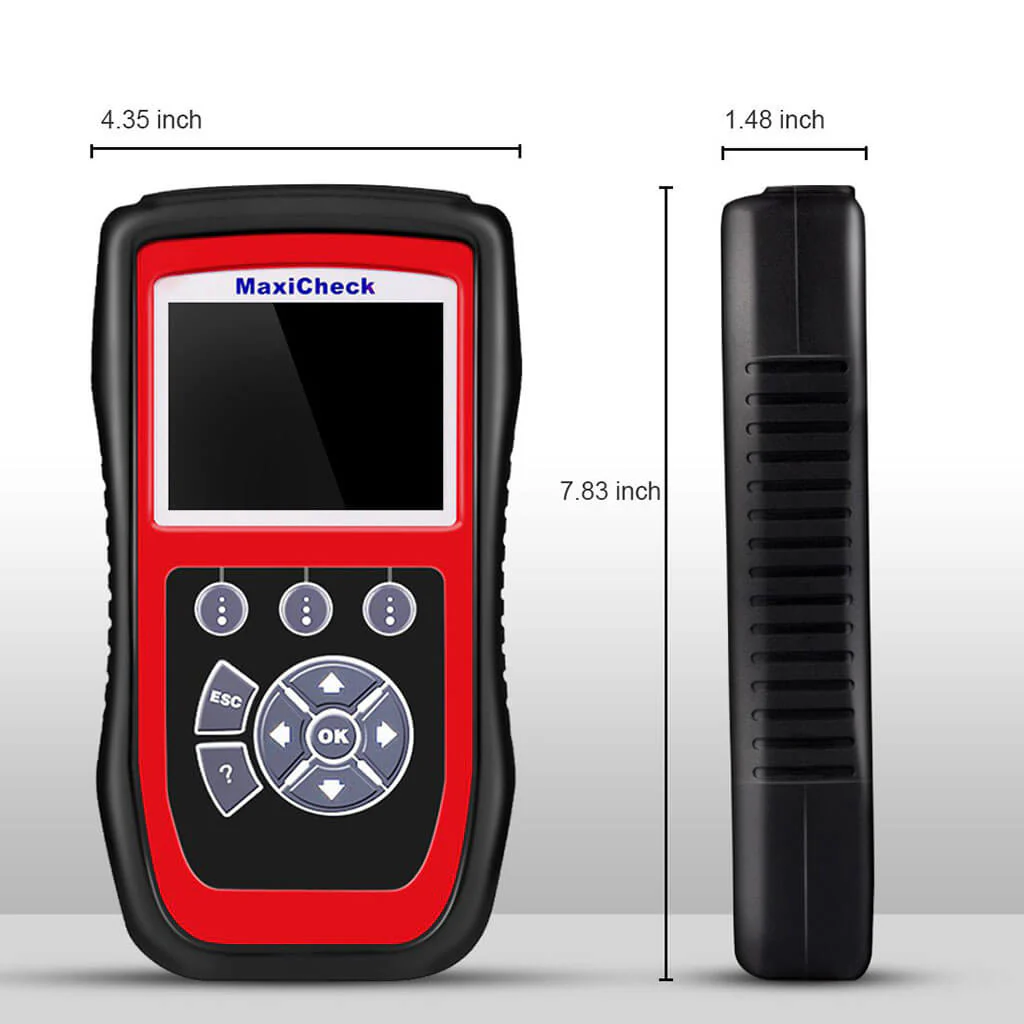
| Dimensions (LxWxH) | 199 mm (7.83”) x 104.5 mm (4.11”) x 37.5 mm (1.48”) |
| Weight | 280 g (without wire) 484 g (with wire) |
Autel AutoLink AL619 Packing List
- 1x Autel AL619
- 1x OBD II Cable
- 1x USB Cable
- 1x Carry Bag
- 1x User Manual
- 1x TF Card
AL619 Product guides and documents
AL619 User Manual (PDF)Certificate
www.diagmart.com is Autel Authorized Online Agent. Products Created by Autel ® Innovation & Quality You Can Trust.

Autel AutoLink AL619 ABS / SRS Diagnosis OBDII Scanner
Autel AutoLink AL619 is the perfect tool for detecting faults in vehicle Anti-Lock Brake (ABS) and Supplemental Restraint System (SRS)/Airbag systems, as well as performing OBD II diagnostics. It provides both visual and audible cues to enhance the tool's ability to aid in quick fault discovery. On-screen troubleshooting tips are also provided to speed up repairs.
Autel AutoLink AL619 Main Functions:
- 1. ABS/ SRS system diagnosis.
- 2. Reading codes, clearing codes
- 3. DTC lookup
- 4. Viewing live data steam in text and graphing for OBDII functions
- 5. Viewing freeze frame data, retrieving I/M readiness status
- 6. Performing O2 monitor test
- 7. On-Board Monitor Test
- 8. Component Test
- 9. Component Test
- 10. Module present and turning off Check Engine Light (MIL)
- 11. Retrieves generic (P0, P2, P3 and U0), manufacturer-specific (P1, P3 and U1) and pending codes
- 12. Internet Updatable & TF memory card for data backup & Diagnosis data playback & printing
ABS/SRS Diagnostic Scanner
The Autel AL619 car diagnostic scan tool is specifically designed to perform ABS/SRS diagnosis, read/erase ABS and SRS (Airbag) codes, and reset the ABS/SRS light on 30+ US, EU, and Asian car makes. It covers model years ranging from 2000 to 2013/2014, and some models from 2015/2016. It provides code definitions to help diagnose problem areas within the systems that may cause the Malfunction Indicator Light (MIL) to illuminate.
Note: The Autel AL619 is not intended for use with newer cars, and its compatibility with different car makes may vary. It is highly recommended to check the functions and compatibility before placing an order.
AL619 FULL OBDII Diagnosis
The Autel AL619 car code reader provides full OBD2 diagnosis to help you obtain a comprehensive understanding of OBD2 protocol-related problems. Additionally, it offers a fast-access option for specific engine-related components, allowing you to instantly obtain diagnostic results.
Ready Test
It can be used by automotive technicians to conveniently determine if a vehicle is ready for an emission test. This can help you check the readiness status before a SMOG CHECK to ensure compliance with state emissions standards. Visual and audible indications will inform you about the vehicle's monitor readiness.
Post-Repair Diagnostic
After performing any emission-related repairs on a vehicle, this function can be used to confirm the successful completion of the repair. It checks if the required drive cycles have been completed to reset the monitoring systems. Drive cycles may vary between vehicles and for each monitor within a specific vehicle.
Turn Off Check Engine Light (CEL)
The Autel AL619 is an enhanced OBDII scanner that enables you to check all engine-related fault codes, identify check engine light alerts, and perform proper repairs using the displayed definitions and tips for DTCs. It can locate faulty O2 sensors, conduct EVAP tests (Mode 8), On-Board Monitor Tests (Mode 6), component tests, check misfires, fuel system status, and retrieve vehicle information.
Complete OBDII Functions
The AL619 obd2 scanner supports all 10 modes of OBD2 tests. It can read and clear diagnostic fault codes (DTCs), retrieve readiness status for smog checks, freeze frame data, and live data from multiple sensors displayed in graphs for identifying fault causes. It can also check fuel efficiency and emission conditions through O2 Monitor Test, EVAP Test (Mode 8), On-Board Monitor Test (Mode 6), retrieve vehicle information, provide DTC definitions for repair, and offer DTC lookup.
Unmatched OBD2 Vehicle Coverage
The Autel AL619 car diagnostic scanner supports all OBD2 protocols, including KWP2000, ISO2000, ISO9141, J1850 VPW, J1850 PWM, and CAN. It is compatible with all OBDII-compliant vehicles, including sedans, SUVs, and light trucks manufactured after 1996 in the US, 2006 for the EU market, and 2009 for the Asian market. It can retrieve all types of codes, including generic, manufacturer-specific, and pending codes. The scanner is plug-and-play, requiring no batteries or apps for easy use.
Review Live Data & Deleting Data & PlayBack Data
1. Reviewing Data
To review data saved in the scan function, select Scan in the Replay menu. To review data saved in the AbsSrs function, select AbsSrs in the Replay menu. Then press OK button to continue
Note: If no data from previously tested vehicle is recorded, a message “No data available!” shows on the screen.
2. Playback Data
The Playback Data function allows viewing data from last test recorded by the scan tool.
3. Deleting Data
By selecting Delete on the AbsSrs screen, you are allowed to erase the selected data on the scan tool. Review the recordings thoroughly before erasing. You could also erase all recordings by select Delete All.
Note: Don't use Delete All unless you are definitely sure what you are going to proceed
DTC Definition & DTC Lookup
1. DTC Definition
The Autel AL619 is a convenient tool that not only retrieves ABS/SRS codes from your vehicle's ECU but also provides a one-button DTC definition function. After reading out the codes, you can simply click the button to instantly access the meanings of the codes, saving you time and improving work efficiency.
2. DTC Lookup
This function functions like a library, allowing users to search for definitions of related DTCs stored in the built-in DTC library. It helps you quickly identify the parts that need to be repaired. For manufacturer-specific codes, you will need to select a specific vehicle make on an additional screen to access the corresponding DTC definitions.
Wide Vehicle Coverage
OBDII Vehicle Coverage
Post 1996 in US, post 2006 for EU market and 2009 for Asian market cars.
ABS/SRS Functions Coverage
Supports 30+ US, EU and Asian car makes and years vary from 2000 to 2013/2014 and some of 2015/2016.
Note: Functions not universal and not intended for newer cars. Recommend to check compatibility with us before placing your order.
Data Print Out & Lifetime Free Update
Data Printing
The Print Data function allows you to print out diagnostic data recorded by the scan tool or create customized test reports by connecting the scan tool to a Windows-based PC or laptop.
Software Update
Autel releases software updates from time to time for you to download and you can clearly know what new content come with it.
- 1. 1. Install MaxiPC Suite through the included CD, or download the applications in our website. You can use a Major a Windows-based computer to download the suitable version and proceed.
- 2. Make sure that your computer is connected to the Internet.
- 3. Load the SD card of the scan tool to your PC.
- 4. Run the Maxi PC Suite. Wait for the Log In window to pop up.
NOTE: AL619 scan tool must be registered on the official website before the update.
Autel AutoLink AL619 Specifications
| Display | TFT color display (320x240 dpi) |
| Operating Temp | 0 to 60 ℃ (32 to 140 ℉) |
| Storage Temp | -20 to 70 ℃ (-4 to 158 ℉) |
| Power | 8.0 to 18.0 V provided via the vehicle battery |
| Dimensions (LxWxH) | 199 mm (7.83”) x 104.5 mm (4.11”) x 37.5 mm (1.48”) |
| Weight | 280 g (without wire) 484 g (with wire) |
Autel AutoLink AL619 Packing List
- 1x Autel AL619
- 1x OBD II Cable
- 1x USB Cable
- 1x Carry Bag
- 1x User Manual
- 1x TF Card
AL619 Product guides and documents
AL619 User Manual (PDF)Certificate
www.diagmart.com is Autel Authorized Online Agent. Products Created by Autel ® Innovation & Quality You Can Trust.
Original: $85.00
-70%$85.00
$25.50Description
Autel AutoLink AL619 ABS / SRS Diagnosis OBDII Scanner
Autel AutoLink AL619 is the perfect tool for detecting faults in vehicle Anti-Lock Brake (ABS) and Supplemental Restraint System (SRS)/Airbag systems, as well as performing OBD II diagnostics. It provides both visual and audible cues to enhance the tool's ability to aid in quick fault discovery. On-screen troubleshooting tips are also provided to speed up repairs.
Autel AutoLink AL619 Main Functions:
- 1. ABS/ SRS system diagnosis.
- 2. Reading codes, clearing codes
- 3. DTC lookup
- 4. Viewing live data steam in text and graphing for OBDII functions
- 5. Viewing freeze frame data, retrieving I/M readiness status
- 6. Performing O2 monitor test
- 7. On-Board Monitor Test
- 8. Component Test
- 9. Component Test
- 10. Module present and turning off Check Engine Light (MIL)
- 11. Retrieves generic (P0, P2, P3 and U0), manufacturer-specific (P1, P3 and U1) and pending codes
- 12. Internet Updatable & TF memory card for data backup & Diagnosis data playback & printing
ABS/SRS Diagnostic Scanner
The Autel AL619 car diagnostic scan tool is specifically designed to perform ABS/SRS diagnosis, read/erase ABS and SRS (Airbag) codes, and reset the ABS/SRS light on 30+ US, EU, and Asian car makes. It covers model years ranging from 2000 to 2013/2014, and some models from 2015/2016. It provides code definitions to help diagnose problem areas within the systems that may cause the Malfunction Indicator Light (MIL) to illuminate.
Note: The Autel AL619 is not intended for use with newer cars, and its compatibility with different car makes may vary. It is highly recommended to check the functions and compatibility before placing an order.
AL619 FULL OBDII Diagnosis
The Autel AL619 car code reader provides full OBD2 diagnosis to help you obtain a comprehensive understanding of OBD2 protocol-related problems. Additionally, it offers a fast-access option for specific engine-related components, allowing you to instantly obtain diagnostic results.
Ready Test
It can be used by automotive technicians to conveniently determine if a vehicle is ready for an emission test. This can help you check the readiness status before a SMOG CHECK to ensure compliance with state emissions standards. Visual and audible indications will inform you about the vehicle's monitor readiness.
Post-Repair Diagnostic
After performing any emission-related repairs on a vehicle, this function can be used to confirm the successful completion of the repair. It checks if the required drive cycles have been completed to reset the monitoring systems. Drive cycles may vary between vehicles and for each monitor within a specific vehicle.
Turn Off Check Engine Light (CEL)
The Autel AL619 is an enhanced OBDII scanner that enables you to check all engine-related fault codes, identify check engine light alerts, and perform proper repairs using the displayed definitions and tips for DTCs. It can locate faulty O2 sensors, conduct EVAP tests (Mode 8), On-Board Monitor Tests (Mode 6), component tests, check misfires, fuel system status, and retrieve vehicle information.
Complete OBDII Functions
The AL619 obd2 scanner supports all 10 modes of OBD2 tests. It can read and clear diagnostic fault codes (DTCs), retrieve readiness status for smog checks, freeze frame data, and live data from multiple sensors displayed in graphs for identifying fault causes. It can also check fuel efficiency and emission conditions through O2 Monitor Test, EVAP Test (Mode 8), On-Board Monitor Test (Mode 6), retrieve vehicle information, provide DTC definitions for repair, and offer DTC lookup.
Unmatched OBD2 Vehicle Coverage
The Autel AL619 car diagnostic scanner supports all OBD2 protocols, including KWP2000, ISO2000, ISO9141, J1850 VPW, J1850 PWM, and CAN. It is compatible with all OBDII-compliant vehicles, including sedans, SUVs, and light trucks manufactured after 1996 in the US, 2006 for the EU market, and 2009 for the Asian market. It can retrieve all types of codes, including generic, manufacturer-specific, and pending codes. The scanner is plug-and-play, requiring no batteries or apps for easy use.
Review Live Data & Deleting Data & PlayBack Data
1. Reviewing Data
To review data saved in the scan function, select Scan in the Replay menu. To review data saved in the AbsSrs function, select AbsSrs in the Replay menu. Then press OK button to continue
Note: If no data from previously tested vehicle is recorded, a message “No data available!” shows on the screen.
2. Playback Data
The Playback Data function allows viewing data from last test recorded by the scan tool.
3. Deleting Data
By selecting Delete on the AbsSrs screen, you are allowed to erase the selected data on the scan tool. Review the recordings thoroughly before erasing. You could also erase all recordings by select Delete All.
Note: Don't use Delete All unless you are definitely sure what you are going to proceed
DTC Definition & DTC Lookup
1. DTC Definition
The Autel AL619 is a convenient tool that not only retrieves ABS/SRS codes from your vehicle's ECU but also provides a one-button DTC definition function. After reading out the codes, you can simply click the button to instantly access the meanings of the codes, saving you time and improving work efficiency.
2. DTC Lookup
This function functions like a library, allowing users to search for definitions of related DTCs stored in the built-in DTC library. It helps you quickly identify the parts that need to be repaired. For manufacturer-specific codes, you will need to select a specific vehicle make on an additional screen to access the corresponding DTC definitions.
Wide Vehicle Coverage
OBDII Vehicle Coverage
Post 1996 in US, post 2006 for EU market and 2009 for Asian market cars.
ABS/SRS Functions Coverage
Supports 30+ US, EU and Asian car makes and years vary from 2000 to 2013/2014 and some of 2015/2016.
Note: Functions not universal and not intended for newer cars. Recommend to check compatibility with us before placing your order.
Data Print Out & Lifetime Free Update
Data Printing
The Print Data function allows you to print out diagnostic data recorded by the scan tool or create customized test reports by connecting the scan tool to a Windows-based PC or laptop.
Software Update
Autel releases software updates from time to time for you to download and you can clearly know what new content come with it.
- 1. 1. Install MaxiPC Suite through the included CD, or download the applications in our website. You can use a Major a Windows-based computer to download the suitable version and proceed.
- 2. Make sure that your computer is connected to the Internet.
- 3. Load the SD card of the scan tool to your PC.
- 4. Run the Maxi PC Suite. Wait for the Log In window to pop up.
NOTE: AL619 scan tool must be registered on the official website before the update.
Autel AutoLink AL619 Specifications
| Display | TFT color display (320x240 dpi) |
| Operating Temp | 0 to 60 ℃ (32 to 140 ℉) |
| Storage Temp | -20 to 70 ℃ (-4 to 158 ℉) |
| Power | 8.0 to 18.0 V provided via the vehicle battery |
| Dimensions (LxWxH) | 199 mm (7.83”) x 104.5 mm (4.11”) x 37.5 mm (1.48”) |
| Weight | 280 g (without wire) 484 g (with wire) |
Autel AutoLink AL619 Packing List
- 1x Autel AL619
- 1x OBD II Cable
- 1x USB Cable
- 1x Carry Bag
- 1x User Manual
- 1x TF Card
AL619 Product guides and documents
AL619 User Manual (PDF)Certificate
www.diagmart.com is Autel Authorized Online Agent. Products Created by Autel ® Innovation & Quality You Can Trust.