Autel MaxiScan MS309 Car Code Reader Check/ Clear Engine Fault Codes Universal OBD2 Diagnostic Scanner
Autel MaxiScan MS309 OBD2 Scanner Engine Fault Code Reader
Quickly scan and define Vehicle Diagnostic Trouble Codes (DTCs) with this user-friendly "handy little tool". It is a compact code reader that allows you to view Vehicle VIN, Freeze Frame Data, check I/M Readiness (Emissions), and monitor status before going for an annual SMOG CHECK. The MS309 is the go-to tool for quickly assessing vehicle health status. It does not require battery power as it is powered by plugging the OBD2 cable into the vehicle's OBD2 socket.
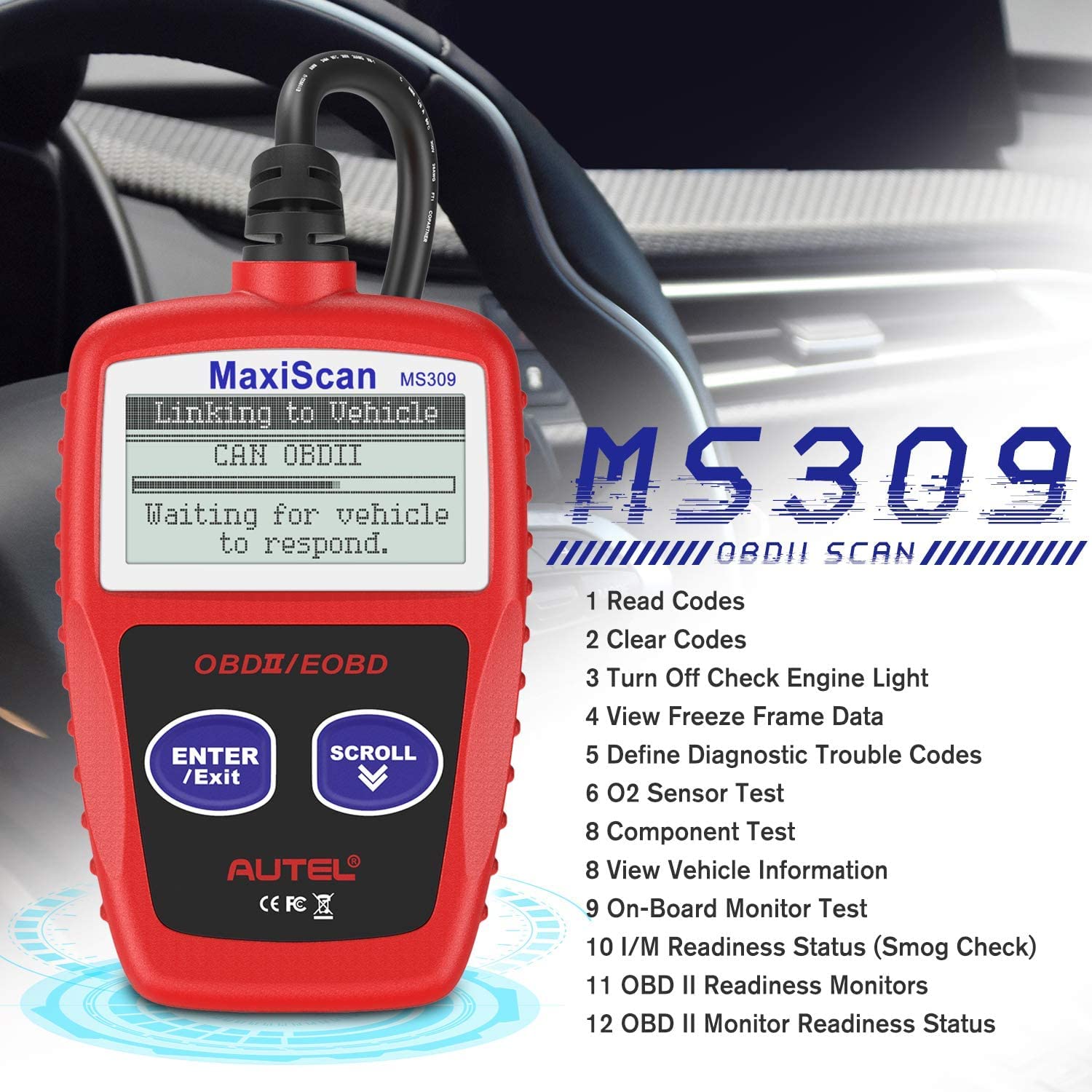
Autel MaxiScan MS309 Main Features
- 1. Read Codes
- 2. Clear Codes
- 3. Turn Off Check Engine Light
- 4. View Freeze Frame Data
- 5. Define Diagnostic Trouble Codes
- 6. O2 Sensor Test
- 7. Component Test
- 8. View Vehicle Information
- 9. On-Board Monitor Test
- 10. I/M Readiness Status(Smog Check)
- 11. OBD II Readiness Monitors
- 12. OBD II Monitor Readiness Status
View Freeze Frame Data
Autel MaxiScan MS309 is a basic and universal OBD2 code reader with View Freeze Frame function.
- 1. To view the freeze frame, use the SCROLL button to select "View Freeze Frame" from the Diagnostic Menu and press the ENTER/EXIT button.
- 2. Wait a few seconds while the code reader validates the PID MAP.
- 3. If the retrieved information covers more than one screen, use the SCROLL button as necessary until all data have been displayed.
- 4. The number "x/x" in the upper right corner of the screen indicates the total number of screens the retrieved freeze frame covers and the sequence of currently displayed data.
- 5. If no freeze frame data is available, an advisory message saying "No Freeze Frame Data Stored!" will be displayed.
Retrieve I/M Readiness Status
The I/M Readiness function is used to check the operations of the Emission System on OBD2 compliant vehicles. It is an excellent function to use prior to having a vehicle inspected for compliance with state emissions programs. Some of the latest vehicle models may support two types of I/M Readiness tests.
- Since DTCs Cleared: indicates status of the monitors since the DTCs are erased.
- This Drive Cycle: indicates status of monitors since the beginning of the current drive cycle.
An I/M Readiness Status result of "NO" does not necessarily indicate that the vehicle being tested will fail the state I/M inspection. In some states, it is permissible for one or more monitors to be "Not Ready" and still pass the emissions inspection.
Retrieve Vehicle Info
The Autel MS309 supports DTC definitions. The definitions will be displayed alongside the codes, providing you with an easier way to read and quickly understand the meaning of the detected fault codes. There is no need to search online for the meaning of the codes.
The Autel MS309 is a useful tool for retrieving a vehicle's VIN. This function proves to be very helpful when purchasing a used vehicle from the market. By retrieving the VIN, you can accurately determine the car's true year and avoid being overcharged.

DTC Definitions Display Below The DTCs Detected
The Autel MS309 supports DTC definitions. The definitions will be displayed under the codes, providing you with an easier way to read and quickly understand the meaning of the detected fault codes. There is no need to search online for the meaning of the codes.

Retrieve Codes & Turn Off Check Engine Light
The Autel MS309 universal OBD2 scanner not only reads and clears generic codes (P0, P2, P3, and U0), but also supports manufacturer-specific codes (P1, P3, and U1), as well as pending codes.
This function is performed with the key on and the engine off (KOEO). Do not start the engine.
Caution: Erasing the Diagnostic Trouble Codes may result in the code reader deleting not only the codes from the vehicle's on-board computer but also the "Freeze Frame" data and manufacturer enhanced data. Additionally, the I/M Readiness Monitor Status for all vehicle monitors will be reset to a Not Ready or Not Complete status. Do not erase the codes until the system has been thoroughly checked by a technician.

Wide Vehicle Coverage
Vehicle OBD support in various regions (for reference)
- European Region: OBD is only supported after 2006;
- Americas: OBD is only supported after 1996;
- Americas: OBD is only supported after 1996;

Autel MaxiScan MS309 Specifications
| Display | Backlit, 128x64 pixel display |
| Operating Temp | 0 to 60 ℃ (32 to 140 ℉) |
| Storage Temp | -20 to 70 ℃ (-4 to 158 ℉) |
| Power | 8 to 18 V provided via the vehicle battery |
| Dimensions (LxWxH) | 110.3 mm (4.34") x 69.5 mm (2.74") x 20.2 mm (0.80") |
| Weight | NW: 180 g (0.39 lb.); GW: 210 g (0.46 lb.) |
Packing List:
- 1x MaxiScan MS309 Main Unit
- 1x 16 PIN Standard OBD II Cable
MS309 Product guides and documents
MS309 User Manual (PDF)Certificate
www.diagmart.com is Autel Authorized Online Agent. Products Created by Autel ® Innovation & Quality You Can Trust.

Autel MaxiScan MS309 OBD2 Scanner Engine Fault Code Reader
Quickly scan and define Vehicle Diagnostic Trouble Codes (DTCs) with this user-friendly "handy little tool". It is a compact code reader that allows you to view Vehicle VIN, Freeze Frame Data, check I/M Readiness (Emissions), and monitor status before going for an annual SMOG CHECK. The MS309 is the go-to tool for quickly assessing vehicle health status. It does not require battery power as it is powered by plugging the OBD2 cable into the vehicle's OBD2 socket.
Autel MaxiScan MS309 Main Features
- 1. Read Codes
- 2. Clear Codes
- 3. Turn Off Check Engine Light
- 4. View Freeze Frame Data
- 5. Define Diagnostic Trouble Codes
- 6. O2 Sensor Test
- 7. Component Test
- 8. View Vehicle Information
- 9. On-Board Monitor Test
- 10. I/M Readiness Status(Smog Check)
- 11. OBD II Readiness Monitors
- 12. OBD II Monitor Readiness Status
View Freeze Frame Data
Autel MaxiScan MS309 is a basic and universal OBD2 code reader with View Freeze Frame function.
- 1. To view the freeze frame, use the SCROLL button to select "View Freeze Frame" from the Diagnostic Menu and press the ENTER/EXIT button.
- 2. Wait a few seconds while the code reader validates the PID MAP.
- 3. If the retrieved information covers more than one screen, use the SCROLL button as necessary until all data have been displayed.
- 4. The number "x/x" in the upper right corner of the screen indicates the total number of screens the retrieved freeze frame covers and the sequence of currently displayed data.
- 5. If no freeze frame data is available, an advisory message saying "No Freeze Frame Data Stored!" will be displayed.
Retrieve I/M Readiness Status
The I/M Readiness function is used to check the operations of the Emission System on OBD2 compliant vehicles. It is an excellent function to use prior to having a vehicle inspected for compliance with state emissions programs. Some of the latest vehicle models may support two types of I/M Readiness tests.
- Since DTCs Cleared: indicates status of the monitors since the DTCs are erased.
- This Drive Cycle: indicates status of monitors since the beginning of the current drive cycle.
An I/M Readiness Status result of "NO" does not necessarily indicate that the vehicle being tested will fail the state I/M inspection. In some states, it is permissible for one or more monitors to be "Not Ready" and still pass the emissions inspection.
Retrieve Vehicle Info
The Autel MS309 supports DTC definitions. The definitions will be displayed alongside the codes, providing you with an easier way to read and quickly understand the meaning of the detected fault codes. There is no need to search online for the meaning of the codes.
The Autel MS309 is a useful tool for retrieving a vehicle's VIN. This function proves to be very helpful when purchasing a used vehicle from the market. By retrieving the VIN, you can accurately determine the car's true year and avoid being overcharged.
DTC Definitions Display Below The DTCs Detected
The Autel MS309 supports DTC definitions. The definitions will be displayed under the codes, providing you with an easier way to read and quickly understand the meaning of the detected fault codes. There is no need to search online for the meaning of the codes.
Retrieve Codes & Turn Off Check Engine Light
The Autel MS309 universal OBD2 scanner not only reads and clears generic codes (P0, P2, P3, and U0), but also supports manufacturer-specific codes (P1, P3, and U1), as well as pending codes.
This function is performed with the key on and the engine off (KOEO). Do not start the engine.
Caution: Erasing the Diagnostic Trouble Codes may result in the code reader deleting not only the codes from the vehicle's on-board computer but also the "Freeze Frame" data and manufacturer enhanced data. Additionally, the I/M Readiness Monitor Status for all vehicle monitors will be reset to a Not Ready or Not Complete status. Do not erase the codes until the system has been thoroughly checked by a technician.
Wide Vehicle Coverage
Vehicle OBD support in various regions (for reference)
- European Region: OBD is only supported after 2006;
- Americas: OBD is only supported after 1996;
- Americas: OBD is only supported after 1996;
Autel MaxiScan MS309 Specifications
| Display | Backlit, 128x64 pixel display |
| Operating Temp | 0 to 60 ℃ (32 to 140 ℉) |
| Storage Temp | -20 to 70 ℃ (-4 to 158 ℉) |
| Power | 8 to 18 V provided via the vehicle battery |
| Dimensions (LxWxH) | 110.3 mm (4.34") x 69.5 mm (2.74") x 20.2 mm (0.80") |
| Weight | NW: 180 g (0.39 lb.); GW: 210 g (0.46 lb.) |
Packing List:
- 1x MaxiScan MS309 Main Unit
- 1x 16 PIN Standard OBD II Cable
MS309 Product guides and documents
MS309 User Manual (PDF)Certificate
www.diagmart.com is Autel Authorized Online Agent. Products Created by Autel ® Innovation & Quality You Can Trust.
Original: $18.99
-70%$18.99
$5.70Description
Autel MaxiScan MS309 OBD2 Scanner Engine Fault Code Reader
Quickly scan and define Vehicle Diagnostic Trouble Codes (DTCs) with this user-friendly "handy little tool". It is a compact code reader that allows you to view Vehicle VIN, Freeze Frame Data, check I/M Readiness (Emissions), and monitor status before going for an annual SMOG CHECK. The MS309 is the go-to tool for quickly assessing vehicle health status. It does not require battery power as it is powered by plugging the OBD2 cable into the vehicle's OBD2 socket.
Autel MaxiScan MS309 Main Features
- 1. Read Codes
- 2. Clear Codes
- 3. Turn Off Check Engine Light
- 4. View Freeze Frame Data
- 5. Define Diagnostic Trouble Codes
- 6. O2 Sensor Test
- 7. Component Test
- 8. View Vehicle Information
- 9. On-Board Monitor Test
- 10. I/M Readiness Status(Smog Check)
- 11. OBD II Readiness Monitors
- 12. OBD II Monitor Readiness Status
View Freeze Frame Data
Autel MaxiScan MS309 is a basic and universal OBD2 code reader with View Freeze Frame function.
- 1. To view the freeze frame, use the SCROLL button to select "View Freeze Frame" from the Diagnostic Menu and press the ENTER/EXIT button.
- 2. Wait a few seconds while the code reader validates the PID MAP.
- 3. If the retrieved information covers more than one screen, use the SCROLL button as necessary until all data have been displayed.
- 4. The number "x/x" in the upper right corner of the screen indicates the total number of screens the retrieved freeze frame covers and the sequence of currently displayed data.
- 5. If no freeze frame data is available, an advisory message saying "No Freeze Frame Data Stored!" will be displayed.
Retrieve I/M Readiness Status
The I/M Readiness function is used to check the operations of the Emission System on OBD2 compliant vehicles. It is an excellent function to use prior to having a vehicle inspected for compliance with state emissions programs. Some of the latest vehicle models may support two types of I/M Readiness tests.
- Since DTCs Cleared: indicates status of the monitors since the DTCs are erased.
- This Drive Cycle: indicates status of monitors since the beginning of the current drive cycle.
An I/M Readiness Status result of "NO" does not necessarily indicate that the vehicle being tested will fail the state I/M inspection. In some states, it is permissible for one or more monitors to be "Not Ready" and still pass the emissions inspection.
Retrieve Vehicle Info
The Autel MS309 supports DTC definitions. The definitions will be displayed alongside the codes, providing you with an easier way to read and quickly understand the meaning of the detected fault codes. There is no need to search online for the meaning of the codes.
The Autel MS309 is a useful tool for retrieving a vehicle's VIN. This function proves to be very helpful when purchasing a used vehicle from the market. By retrieving the VIN, you can accurately determine the car's true year and avoid being overcharged.
DTC Definitions Display Below The DTCs Detected
The Autel MS309 supports DTC definitions. The definitions will be displayed under the codes, providing you with an easier way to read and quickly understand the meaning of the detected fault codes. There is no need to search online for the meaning of the codes.
Retrieve Codes & Turn Off Check Engine Light
The Autel MS309 universal OBD2 scanner not only reads and clears generic codes (P0, P2, P3, and U0), but also supports manufacturer-specific codes (P1, P3, and U1), as well as pending codes.
This function is performed with the key on and the engine off (KOEO). Do not start the engine.
Caution: Erasing the Diagnostic Trouble Codes may result in the code reader deleting not only the codes from the vehicle's on-board computer but also the "Freeze Frame" data and manufacturer enhanced data. Additionally, the I/M Readiness Monitor Status for all vehicle monitors will be reset to a Not Ready or Not Complete status. Do not erase the codes until the system has been thoroughly checked by a technician.
Wide Vehicle Coverage
Vehicle OBD support in various regions (for reference)
- European Region: OBD is only supported after 2006;
- Americas: OBD is only supported after 1996;
- Americas: OBD is only supported after 1996;
Autel MaxiScan MS309 Specifications
| Display | Backlit, 128x64 pixel display |
| Operating Temp | 0 to 60 ℃ (32 to 140 ℉) |
| Storage Temp | -20 to 70 ℃ (-4 to 158 ℉) |
| Power | 8 to 18 V provided via the vehicle battery |
| Dimensions (LxWxH) | 110.3 mm (4.34") x 69.5 mm (2.74") x 20.2 mm (0.80") |
| Weight | NW: 180 g (0.39 lb.); GW: 210 g (0.46 lb.) |
Packing List:
- 1x MaxiScan MS309 Main Unit
- 1x 16 PIN Standard OBD II Cable
MS309 Product guides and documents
MS309 User Manual (PDF)Certificate
www.diagmart.com is Autel Authorized Online Agent. Products Created by Autel ® Innovation & Quality You Can Trust.